
How to Apply for Issuance of Drawings Approval for Electrical Installations (TEI-401) Online Easily!!
Service Code: TEI-401 | Department: Tamil Nadu Electrical Inspectorate
Purpose:
The Issuance of Drawings Approval for Electrical Installations service enables applicants to apply for drawings approval through the e-District portal.
This service is designed for:
- New electrical installations
- Addition / Alteration electrical installations
- EHV / HV installations
- HT MSB / LT MSB installations
- Windmill installations
- Solar installations
Required Information:
Mandatory for Application:
- Consumer Type (New / Addition / Alteration)
- Consumer Number (for Addition / Alteration)
- Consumer Details
- Office Details
- Contractor Details
- Contractor Electrical Supervisor Details
- Chairman / MD / Authorized Signatory Details
- Technical Details
- Drawing Reference Number
- Number of Drawings
- Supporting Documents
Special Requirements:
- Valid Login Credentials: Operator must have valid username and password
- Captcha Verification: Mandatory during login
- Consumer Number: Required for Addition / Alteration applications
- Declaration Acceptance: Applicant must accept declaration before submission
- Document Upload: Mandatory supporting documents must be uploaded
- Payment Confirmation: Application process completes only after payment confirmation
Step-by-Step Application Process:
PART A: OPERATOR LOGIN AND SERVICE NAVIGATION
Access the Portal:
Go to the Tamil Nadu e-Sevai Portal (https://tnesevai.tn.gov.in/?utm_source=chatgpt.com)
Operator Login:
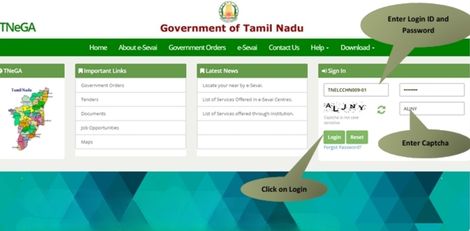
- Enter your login credentials (username and password)
- Make sure “Operator” is selected in Operator Type
- Enter the Captcha code displayed on screen
- Click Login
Access Dashboard:
After successful login, e-Sevai D Dashboard will appear
Navigate to Service:
- Click on Services from the left panel
- Department-wise service listing will appear
- Click on Tamil Nadu Electrical Inspectorate (TNEI)
- Alternatively, use Service Wise listing or Search option to locate the service
Select Service:
- Click on TEI-401 Issuance of Drawings Approval
- You will be redirected to the Tamil Nadu e-District service page
PART B: APPLICATION FOR DRAWINGS APPROVAL
Select Consumer Type:
- Select Consumer Type (New / Addition / Alteration)
Note:
If “Addition / Alteration” is selected, enter the Consumer Number before proceeding further
EHV / HV Installation Details:
- Specify Yes / No for EHV / HV Installation
- If Yes, specify total aggregate capacity of either Transformer or Generator
HT MSB Details:
- Specify Yes / No for HT MSB (Multi Storey Building)
- If Yes, specify total aggregate capacity of either Transformer or Generator
LT MSB Details:
- Specify Yes / No for LT MSB (Multi Storey Building)
Windmill Details:
- Specify Yes / No for Windmill
Solar Details:
- Specify Yes / No for Solar
Note:
Specify Yes / No for HV/MV Addition / Alteration if Consumer Type is Addition / Alteration
Enter Consumer Details:
Fill all required Consumer Details
Enter Office Details:
Fill all required Office Details
Enter Contractor Details:
Fill Contractor Details
Enter Contractor Supervisor Details:
Fill details of Contractor’s Electrical Supervisor
Enter Authorized Signatory Details:
Fill details of Chairman / MD / Authorized Signatory
Enter Technical Details:
Fill all required Technical Details
Total Fees and Circle Address will show up
Enter Drawing Details:<>
- Enter Drawing Reference Number
- Enter Number of Drawings within section a) to g)
Declaration and Submission:
- Accept Declaration
- Click Submit
Document Upload Process:
Upload Supporting Documents:
Upload required documents in prescribed file size and file type
For each document:
- Select document type
- Enter document number
- Browse and upload document
Uploaded documents will appear at the bottom
Uploaded documents can be removed using the cross sign
Please Note:
- The Upload button will appear once document is selected
- Challan copy must be downloaded using available links
Make Payment:
- After uploading documents, click Make Payment
- Payments page will appear showing Total Fees
- Click Confirm Payment
Download Acknowledgement Receipt:
- Acknowledgement receipt page will appear
- Click Print Receipt to download or print the receipt
- Save the receipt for future reference
Document Requirements:
Mandatory Supporting Documents:
- Drawings and technical documents
- Contractor related documents
- Consumer related documents
- Supervisor details documents
- Challan copy
- Any other document as specified
Payment Details:
- Total Fees: Displayed based on application details
- Payment Confirmation: Mandatory for completing application
After Submission:
Draft Applications:
Available under Saved Application section
Submitted Applications:
Available under Submitted Application section
Application Status:
Can be checked under Check Status section using Application Number
Receipt Reprint:
Available under Reprint Receipt section
DoDownloading Certificate:
Once the application is approved and digitally signed, the License for Issuance of Drawing Approval can be downloaded from the Operator Desk.
Steps to Download Certificate:
1. Click on Check Status
2. Enter Application Number
3. Click Search
4. Application details will appear
5. Click Download Certificate link
6. Certificate will be downloaded successfully
Important Notes:
- User must have valid username and password
- Mandatory fields cannot be left blank
- Make relevant and correct entries only
- Recheck all entries before clicking Submit
- Mandatory / Optional documents should be attached as required
- Do not make false entries
- Keep acknowledgement receipt for future reference
- Stable internet connection is recommended
Browser Requirements:
- Browser: Mozilla Firefox Version 40 or Above
- Internet Connection: Stable connection required
Assistance:
- Apply Online: Tamil Nadu e-Sevai Portal (https://tnesevai.tn.gov.in/)
- Visit: Nearest e-Sevai Centre / CSC Centre for assistance
- Department: Tamil Nadu Electrical Inspectorate
This guide is based on the Tamil Nadu e-District User Manual for Issuance of Drawings Approval for Electrical Installations (TEI-401).
Top Stories
-
 Baby Powder for Babies: Is It Safe? What Are the Best Alternatives?13/Jul/2026 10:29:37 AM
 -
 Tamil Nadu Government Directs Clearance of All NHIS Insurance Claims by August 3113/Jul/2026 10:17:37 AM
 -
-

-
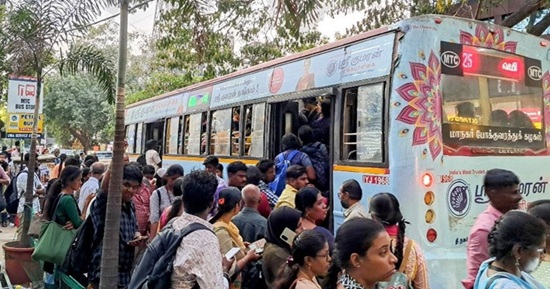 Tambaram Bus Terminus Crowded as 41 Suburban Train Services Are Cancelled for Maintenance13/Jul/2026 10:00:08 AM
 -
 Power Shutdown Areas in Chennai - Tuesday (14-07-2026)13/Jul/2026 9:54:59 AM