Indane LPG Gas KYC Online: Step-by-Step Guide to Update Aadhaar and Complete eKYC
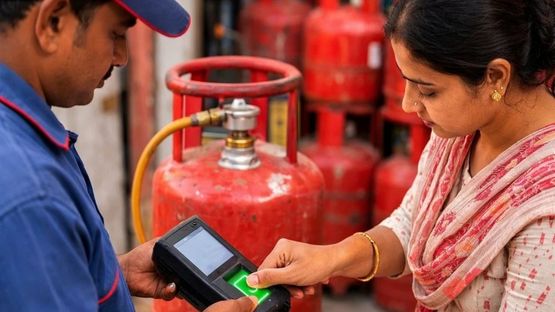
Indane LPG customers who have not yet updated their KYC details should be aware of the importance of completing the process to ensure uninterrupted cylinder deliveries and continued access to Direct Benefit Transfer (DBT) subsidies.
Linking Aadhaar with the LPG connection helps verify the customer`s identity, residential address and connection ownership details. The eKYC process can be completed online through official Indane platforms using a registered mobile number, allowing customers to update their details without visiting an LPG distributor.
However, customers who have already completed eKYC do not need to repeat the process. The biometric Aadhaar authentication requirement applies only to users whose authentication has not yet been completed.
Why Is KYC Important for an Indane LPG Connection?
An Indane LPG connection allows customers to receive LPG cylinders at their registered address for domestic or commercial use. The connection is linked to the customer`s identity and, where applicable, bank account details to facilitate government subsidies through the DBT system.
Keeping KYC details updated helps ensure:
- Continued LPG cylinder delivery without unnecessary service interruptions
- Accurate verification of identity and address
- Prevention of duplicate LPG connections
- Better compliance with safety requirements
- Improved account security
- Timely credit of eligible LPG subsidies
How to Complete Indane LPG eKYC Online
Customers can complete the eKYC process through the IndianOil One mobile app or the official My LPG platform. Aadhaar authentication and a registered mobile number are generally required to complete the process.
eKYC Through the IndianOil One App
1. Download the IndianOil One app on your Android or iOS smartphone.
2. Also install the AadhaarRD Face app if it is required for biometric or face authentication.
3. Register or sign in using the mobile number linked to your LPG account.
4. Link your 16-digit LPG ID, which can be found on your cash memo.
5. Open My Profile from the app`s home screen.
6. Go to LPG Details and select the Indane Details section.
7. Tap the eKYC option.
8. Read the terms and conditions and provide your consent.
9. Select the face-scan option and complete the required biometric verification.
10. Submit the eKYC request.
ThThe verification process may typically take 24 to 48 hours for approval.
Customers should also ensure that their Aadhaar biometric authentication is available for verification. If Aadhaar biometrics are locked, they may need to unlock them through the mAadhaar app before completing the process.
eKYC Through UMANG
Customers can also use the UMANG platform to complete their eKYC.
1. Open the official UMANG platform.
2. Select IndianOil services.
3. Choose the eKYC option.
4. Log in using your registered mobile number and MPIN.
5. Follow the instructions displayed on the screen.
6. Complete and submit the eKYC application.
Documents and Details Required for Indane eKYC
Customers should keep the following information ready before starting the online KYC process:
- Aadhaar card: Required for Aadhaar-based OTP or biometric authentication.
- Registered mobile number: The number linked to the existing LPG connection.
- LPG connection details: This may include the customer ID, consumer number or LPG connection number.
- Smartphone or computer: A device with internet access is required to complete the online process.
- Camera: A camera-enabled device may be required for face or biometric authentication.
For online KYC, customers generally do not need to submit physical documents to the distributor.
Indane Gas Customer Care Number
Indane LPG customers who need assistance with LPG services can contact the toll-free customer care number 1800-2333-555.
The helpline can assist customers with queries related to new connections, cylinder bookings, KYC updates, Aadhaar authentication and other LPG-related services.
Customers should keep their LPG connection details and registered mobile number handy when contacting customer support to make the verification process easier.
Top Stories
-
Indane LPG Gas KYC Online: Step-by-Step Guide to Update Aadhaar and Complete eKYC14/Aug/2026 3:07:00 PM
-
 Selling Inherited Gold Jewellery? Here’s How Capital Gains Tax Is Calculated14/Aug/2026 1:38:19 PM
 -
 How to Identify Fake Bank SMS Messages and Protect Your Money14/Aug/2026 1:29:06 PM
 -

-
 Important Car and Bike Insurance Rules: What Vehicle Buyers Need to Know14/Aug/2026 12:56:17 PM
 -