How to Apply for Profile Updation (EMP-501) in Tamil Nadu
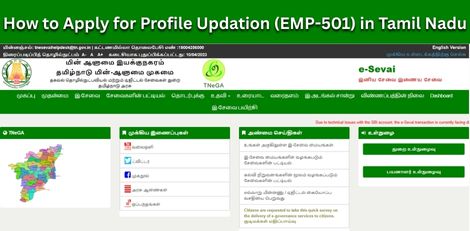

Service Code: EMP-501 | Department Charges: ₹0 | Service Charge: Varies
Purpose:
This service allows individuals already registered with the Tamil Nadu Employment and Training Department to update their personal, educational, skill, or technical details in their employment exchange profile, ensuring their records are current for job matching and government schemes.
Prerequisites:
- Existing Registration Number with Employment Department
- Valid CAN (Citizen Access Number)
- Updated supporting documents for changes (if applicable)
Application Process:
1. Login to E-District Portal as Operator
- Visit: https://www.tnesevai.tn.gov.in/
- Select Operator Login
- Enter Username, Password, and Captcha
- Click Login
2. Navigate to Employment & Training Department
- Click on Services
- Select Department Wise - Employment and Training
3. Select Profile Updation Service
- Click on EMP-501 Application for Profile Updation
4. Fetch Existing Profile
- Enter the applicant`s Registration Number
- Click Fetch Details
- System will populate existing personal details
5. Update Personal Details
- Edit editable fields such as:
- Mobile Number
- Email ID
- Address
- Marital Status
- Other relevant personal information
- Ensure Aadhaar number is correct
- Click Save
6. Update Qualification Details
- Click QUALIFICATION DETAILS tab
- Select Qualification Type
- Enter updated qualification information
- Click Add
- Click Save
7. Update Skill Details
- Click SKILL DETAILS tab
- Select Skill Type
- Enter updated skill information
- Click Add
- Click Save
8. Update Technical Details
- Click TECHNICAL DETAILS tab
- Select Technical Qualification Type
- Enter technical course details
- Click Add
- Click Save
9. Submit and Generate Receipt
- Click Submit
- System will process the updation
- Click Print Receipt
- Save the receipt for your records
Alternative Method - Recommended:
Visit nearest eSevai / CSC Centre
- Operator will assist with updation process
- Help with document verification and data entry
- Service charges apply as per current rates
After Profile Updation:
- Changes reflect immediately
- Keep acknowledgement receipt
- Updated profile improves job matching accuracy
- Registration remains active
Important Notes:
- Only editable fields can be modified
- Core details such as Name, Father`s Name, Date of Birth, Community mayay not be editable
- Supporting documents may be required
- Mobile and email updates are important for job alerts
For issues, contact:
Help Desk: [email protected]
Toll-Free: 1800-425-3333
Apply Online: https://tnedistrict.tn.gov.in
For assistance: Visit nearest eSevai / CSC Centre
This guide is based on the Tamil Nadu e-District Application Training Manual (EMP-501 Application for Profile Updation). Government of Tamil Nadu, 2017.