
How to Apply for a New Ration Card (PDS-501) Online Easily!!
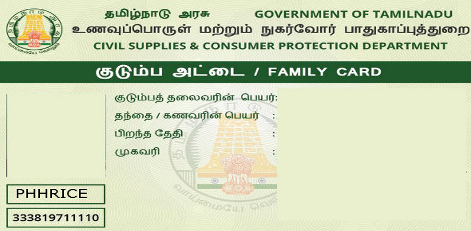
Service Code: PDS-501 | Department: Civil Supplies and Consumer Protection Department
Purpose:
The Application for New Ration Card service enables eligible households to apply for a new ration card through the e-District portal. This service is designed for:
- Families/households without an existing ration card
- Newly married couples establishing a separate household
- Individuals/families who have recently moved to Tamil Nadu
- Households that never possessed a ration card before
- Eligible beneficiaries seeking access to public distribution system (PDS) benefits
Required Information:
Mandatory Details:
- Applicant personal details (name, date of birth, gender, etc.)
- Complete address (door number, street, locality, district, taluk, village)
- Contact details (mobile number, email if available)
- Family member details (all members to be included in the ration card)
- Gas connection details (if applicable)
Special Requirements:
- Bilingual Form: Application can be filled in both Tamil and English languages
- Family Details: Must provide complete information for all family members to be included
- Gas Connection: Must declare existing LPG connection details (if any)
- Address Proof: Required to verify residential address
- Identity Proof: Required for applicant and all family members
Step-by-Step Application Process:
1. Access the Portal: Login to the Tamil Nadu e-Sevai Portal as an Operator
2. Navigate to Service:
- Click on Services from the left panel
- Select Civil Supplies and Consumer Protection Department from the department list
- Click on PDS-501 Application for New Ration Card
3. Fill Application Form - SECTION 1: Applicant Details and Address
- Fill the form in both Tamil and English languages as required
- Enter applicant`s personal details:
- Name
- Father`s/Spouse`s name
- Date of birth
- Gender
- Marital status
- Educational qualification
- Occupation
- Enter residential address with complete details:
- Door/Flat number
- Street name
- Locality/Area
- Landmark (if any)
4. SECTION 2: Contact Details and Location Information
- Select District from dropdown menu
- Select Taluk from dropdown menu
- Select Village/Ward from dropdown menu
- Enter Mobile Number (mandatory)
- Enter Email ID (optional)
- Enter Alternate Phone Number (if available)
5. SECTION 3: Addition of Family Members
- Click Add Member to add each family member
- For each member, provide:
- Name
- Relationship with head of family
- Date of birth
- Gender
- Marital status
- Aadhaar number (if available)
- Educational qualification
- Occupation
- After filling details, click Save for each member
- Added members appear in the list below
- Repeat process to add all family members to be included in ration card
6. SECTION 4: Details of Gas Connection
- Specify whether the household has an LPG connection (Yes/No)
- If Yes, provide:
- Gas connection number
- Gas agency name
- Gas agency code (if known)
- Number of cylinders (subsidized/non-subsidized)
7. Submit Application: Click Submit after completing all sections
8. Make Payment:
- Click Make Payment after submission
- Service Fees will be displayed on payment page
- Click Confirm Payment to proceed
9. Download Acknowledgement Receipt:
- Acknowledgement receipt will be shown after successful payment
- Click Print Receipt to download/print the receipt
- Save the receipt using Transaction Number for future reference
Document Requirements:
Typical Documents Needed (to be uploaded/provided):
- Applicant`s photograph (passport size)
- Photographs of all family members (as required)
- Address proof (Aadhaar card, Voter ID, Passport, Driving License, etc.)
- Age proof for all members (Birth certificate, School certificate, etc.)
- Income certificate (if applicable for specific ration card category)
- Aadhaar cards of all family members (if available)
- Gas connection proof (if applicable)
- Rental agreement (if residing in rented premises)
- Declaration form (as prescribed)
Payment Details:
- e-Sevai Centre Charges: ₹60.00 (as per specimen receipt)
- Government Fees: As applicable (may vary based on category)
- Total Amount: As displayed on payment page
- Payment Confirmation: Required to complete application
After Submission:
- Application Tracking: Status can be checked using Transaction Number/Application Number
- Verification: Application will be verified by concerned officials
- Field Inspection: Possible physical verification of residence
- Approval: Processed by Civil Supplies Department
- Ration Card Generation: Smart card issued upon approval
- Delivery: Ration card dispatched to registered address
Downloading/Checking Application Status:
1. Go to Check Status section on the portal
2. Enter Application Number or Transaction Number
3. Click Search to view current status
4. Track progress through various stages (submitted, under verification, approved, dispatched)
Important Notes:
- Bilingual Entry: Information must be entered in both Tamil and English where required
- Complete Family Details: Ensure all eligible family members are added to avoid future corrections
- Accurate Information: Provide correct and verifiable details to avoid rejection
- Gas Declaration: Must disclose existing LPG connection; non-disclosure may affect eligibility
- Document Readiness: Keep all required documents ready before starting application
- Photo Requirements: Ensure photographs meet prescribed specifications
- Aadhaar Linking: Aadhaar linkage is mandatory for receiving subsidies
- Category Selection: Choose appropriate ration card category (APL/BPL/AAY, etc.) based on eligibility
- Joint Declaration: All adult members may need to sign declaration
- Physical Submission: Some documents may need to be submitted physically at designated center
Ration Card Types (General Categories):
- APL (Above Poverty Line): For families above poverty line
- BPL (Below Poverty Line): For families below poverty line
- AAY (Antyodaya Anna Yojana): For poorest of poor families
- PHH (Priority Household): Under National Food Security Act
Validity Period:
- Ration card is generally valid until cancelled or updated
- Periodic updates/verification may be required as per government norms
Assistance:
- Apply Online: https://tnesevai.tn.gov.in
- Visit: Nearest e-Sevai Centre / CSC Centre for application assistance
- Help Desk: Contact Tamil Nadu e-Governance Agency for technical support
Sample Receipt Information (as per specimen):
- Receipt No: 07220305907357
- Transaction No: TNTACTRI01502606
- Application Date: 05-03-2022 15:58:18
- Service: Application for New Ration Card
- e-Sevai Centre Charges: ₹60.00
- Centre Name & Code: Madhavaperumalkoil Panchayat - TACTV-TACTRI015
This guide is based on the Tamil Nadu e-District User Manual (PDS-501). Government of Tamil Nadu.
Top Stories
-
 Tomorrow Panchangam October 12, 2026 | Auspicious Timings, Rahu Kalam, Gulikai10/Oct/2026 5:36:28 PM
 -
 Tomorrow Panchangam October 11, 2026 | Auspicious Timings, Rahu Kalam, Gulikai10/Oct/2026 5:34:06 PM
 -
 Chennai Traffic Diversions on October 11 for PM Modi’s Visit10/Oct/2026 5:30:49 PM
 -
 Grand Golu Exhibition Featuring 4,000 Dolls to Begin in Kolathur10/Oct/2026 5:22:10 PM
 -
 Poonamallee–Vadapalani Metro Timings: Train Schedule and Frequency10/Oct/2026 5:13:18 PM
 -
 Poonamallee - Vadapalani Metro Service to Begin on October 1110/Oct/2026 5:05:18 PM

 JB Soft System