
Loan Assistance Scheme for Differently Abled Persons | Tamil Nadu e-District Services
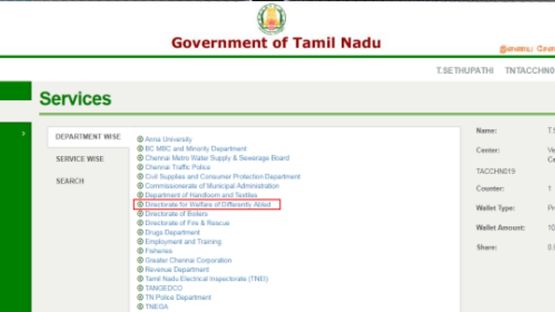
Directorate for Welfare of Differently Abled Persons
PURPOSE:
The Loan Assistance Scheme for Differently Abled Persons is a Government of Tamil Nadu initiative under the e-District / e-Sevai platform to provide financial assistance for eligible differently abled citizens.
This service supports:
- Self-employment activities
- Livelihood improvement
- Economic empowerment
Eligible applicants:
- Differently abled persons in Tamil Nadu
- Citizens applying via CSC / e-Sevai centres
- Applicants with valid CAN (Citizen Access Number)
REQUIRED INFORMATION:
- Applicant Name
- Father / Guardian Name
- Date of Birth
- Mobile Number
- Email ID (optional)
- Gender
- Current Address details
- Bank Account details
- Disability details (if applicable)
- CAN (Citizen Access Number)
- Income details (if required)
STEP-BY-STEP APPLICATION PROCESS:
1. Visit https://tnesevai.tn.gov.in
2. Login using username, password, and captcha
3. Click Services → Department Wise Services
4. Select Directorate for Welfare of Differently Abled Persons
5. Click “Application for Loan Assistance Scheme for Differently Abled Persons”
6. Click Proceed
7. Search applicant using CAN / Mobile / Name / DOB
8. If CAN not available, click Register CAN
9. Fill CAN registration form with details
10. Verify OTP and submit CAN registration
11. Enter CAN number and click Search
12. Select record and verify OTP
13. Click Proceed to application form
14. Fill mandatory details and click Submit
15. Upload required documents
16. Click Make Payment
17. Confirm payment
18. Download acknowledgment receipt
DOCUMENT REQUIREMENTS:
- Aadhaar Card
- Disability Certificate
- Address Proof
- Bank Passbook Copy
- Passport Size Photo
- Income Certificate (if required)
- Mobile number for OTP verification
PAYMENT DETAILS:
- Service fee must be paid through e-Sevai portal
- Payment mode varies as per portal
- Charges are as per government norms / portal rules
AFTER SUBMISSION:
- Application saved in Submitted Applications section
- Status tracking available using Application Number
- SMS / Email updates provided
- Rejection notifications sent via SMS / Email
- Receipt can be reprinted anytime
CERTIFICATE DOWNLOAD PROCESS:
- Login to https://tnesevai.tn.gov.in
- Go to Certificate Download section
- Enter Application Number (TN-XXXXXXXXXXXX)
- Click Search
- Download approved certificate
- Print or save for records
IMPORTANT GUIDELINES / CONDITIONS:
- All details must be accurate anand verified
- Mandatory fields should not be left blank
- OTP verification is compulsory
- False information leads to rejection
- Documents must be valid and clear
- Applications are processed by government officers
- Rejected applications will be notified via SMS / Email
- CAN number is mandatory for application processing
- Browser requirement: Google Chrome recommended
- Stable internet connection required
APPLY ONLINE: https://tnesevai.tn.gov.in
ASSISTANCE: e-Sevai Centres / CSC Centres
Top Stories
-
 TNOU Opens Admissions for 2026-27 Academic Year; Applications Invited16/Jun/2026 3:18:22 PM
 -
 Tamil Nadu Weather Update: Heavy Rain Likely in 7 Districts Tomorrow16/Jun/2026 3:14:25 PM
 -
 Chennai Traffic Set for Major Upgrade with AI Signals | Watch Full Video16/Jun/2026 3:08:41 PM
 -
 MOTOTECH 26 South to Showcase Latest Automotive Technology in Chennai16/Jun/2026 3:03:19 PM
 -
Loan Assistance Scheme for Differently Abled Persons | Tamil Nadu e-District Services16/Jun/2026 2:50:00 PM
-
 Dhanush to Direct Son Yatra’s Acting Debut in a Mass Commercial Entertainer16/Jun/2026 12:59:34 PM