
How to remove Windows 10 icon from task bar
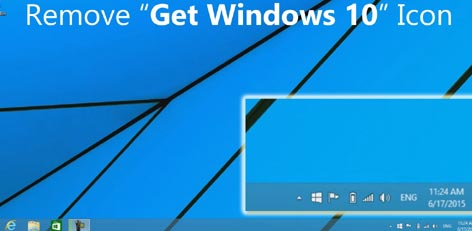
Many new Windows 10 users have complained about the icon that doesn`t seem to go away from the desktop`s task bar . The recently launched operating system has been received well, in general. Here is how you may uninstall the system, if you wish, or remove the icon if you want to.
To uninstall the Windows 10 update:
- Click on the Control Panel in the Windows Startup Menu.
- Go to Program and then to Options. Here, choose View Installed Update
- A list of installations will pop up. Choose KB3035583. This is the update.
- Right click and choose Uninstall
- Now, go back to Control Panel. Select System and Security.
- Select Windows Update and then, Check for Updates.
- Wait until it searches for all the updates. Now, click Show All Available Updates
- Search for KB3035583 again. Right click and select Hide Update. This is will make sure the icon does not show up again.
Top Stories
-
 Dengue Cases Rise in Tamil Nadu: 17,649 Cases Reported So Far23/Sep/2026 12:41:29 PM
 -
 10th and 12th Public Exam: Government Issues New Name Entry Rules for Students23/Sep/2026 12:29:16 PM
 -
 Chennai Traffic Changes on OMR, Thoraipakkam23/Sep/2026 12:06:17 PM
 -
 Drooling While Sleeping: Causes, Reasons and Warning Signs23/Sep/2026 11:57:57 AM
 -
 Chennai Metro Phase 2: 14.64 Km Stretch Awaits Inauguration Date23/Sep/2026 11:38:55 AM
 -
 Bank Employees Announce Three Day Nationwide Strike From September 2823/Sep/2026 10:57:27 AM