
How to Process Marriage Assistance Scheme for Differently Abled Persons (Officials Manual)
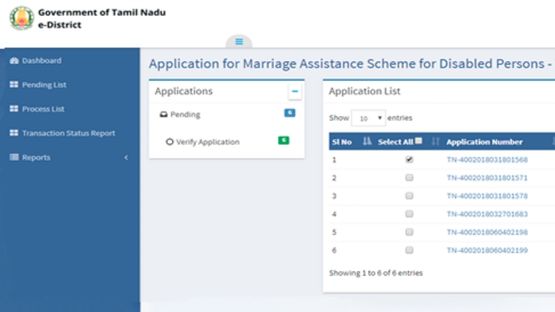
Service Name: Marriage Assistance Scheme for Differently Abled Persons | Department: Social Welfare / DDAW
Purpose:
This user manual provides step-by-step guidance for officials (DDAW - Department for Differently Abled Welfare) to process applications for the Marriage Assistance Scheme for Differently Abled Persons through the e-District portal. This service is designed for:
- DDAW Officials processing scheme applications
- Inspectors verifying application details
- Sanctioning Authorities approving/rejecting applications
- Committee Members (DACOMMT) reviewing applications
- Officials generating sanction orders and eligibility reports
Scope:
This document covers the processing, verification, approval, and report generation for the Marriage Assistance Scheme for Differently Abled Persons service offered under the Social Welfare / DDAW Department.
Getting Started:
Following points and guidelines may be referred while accessing the e-District application:
- User must have valid username and password
- Make relevant and correct entries only
- Recheck the entries before clicking on Submit button
- Mandatory fields should not be left blank
- Mandatory/Optional documents should be attached as per requirement
- Do not make false entries
Step-by-Step Official Processing Workflow:
PART A: OFFICIAL LOGIN AND APPLICATION PROCESSING
1. Access the Portal: Go to the Tamil Nadu e-District Portal
2. Official Login:
- Enter your login credentials (username and password)
- Enter the Captcha code displayed on screen
- Click Sign In
3. Access Dashboard:
- After successful login, you will be redirected to the e-District Dashboard
4. View Pending Applications:
- Click on Pending List on the left panel
- Below screen will be displayed showing pending applications
5. Select Application to Process:
- Click on the application link: "Application for Marriage Assistatance Scheme for disabled persons"
- Below screen will be displayed
6. Verify Application:
- Click on Verified Application
- Below screen will be displayed
7. Select Specific Application:
- Select the application to be processed
- Click on the Application Number as shown in the image
- The e-form will be displayed
8. Review and Process Application:
- Fill all the mandatory fields (if any missing)
- Upload supporting documents (if any)
- Choose the Action from dropdown:
- Forward - Send to next level for processing
- Reject - If application is invalid (Note: In case of Rejection at any stage, the application will become invalid and the concerned applicant will be notified via SMS/Email)
- Click Submit
9. Submission Confirmation:
- On successful submission, below page will be displayed confirming the action
PART B: GENERATE SANCTION ORDER
10. Navigate to Sanction Order Generation:
- Click on the Application for Marriage Assistance Scheme for Disabled Person link (Image 8)
- Click on Generate Sanction Order (Image 10)
11. Process Sanction Order:
- Select the Action (Approve)
- Enter comments if required
- Click Submit
- On successful submission, confirmation page will be displayed
12. Verify Sanction Amount:
- Note: It can be observed that the application has been granted ₹50,000 + 8gm gold which shows that the Qualification of the applicant falls under the graduate category
- To cross verify, official can check the application form attached by clicking on the link at the right panel
13. View Application Form:
- Click on the link at the right panel to view the attached application form
- Below application form will be displayed
14. View Action History:
- Official can also view Action History to track the Application flow through different levels
- This helps track the application`s journey through various stages of processing
PART C: ELIGIBILITY LIST AND REPORT GENERATION
15. Add Eligibility List:
- Click on Add Eligibility List section (Image 8)
- Select the Action (Approve)
- Enter comments (if required)
- Click Submit
16. Application Count Update:
- On successful submission, below page will be displayed
- The Count for No. of Application gets incremented on successful submission
- Note: Official can also select multiple applications for approval by clicking on Add Selected to List
17. Prepare List:
- Once the application count gets incremented, click on `Prepare this List` to generate the list of beneficiaries that should be made available in the Reports Section
18. View Reports:
- Officials can view the generated reports for Eligibility/Sanctioned list under Reports in the left panel
19. Select Report Type:
- Click on required report - Sanction Order/Eligibility Report
- Below screen will be displayed
20. Generate Report:
- Select by month or date
- Choose appropriate options from dropdown for:
- Service
- List Type
- List Status
- Click Show
21. View Eligibility List:
- Below image shows the report of the Eligibility list
- To view the Eligibility Order report, click on that particular Ref Number
- Below screen will be displayed
22. Export Reports:
- Note: Official can also export the particular list or report in these available formats:
- XML
- CSV
- MHTML
- Excel
- TIFF File
-
PART D: ADD ELIGIBILITY LIST (Detailed Steps)
23. Access Eligibility List Section:
- Click on Add Eligibility List
- Below screen will be displayed (Image 8)
24. Select Action:
- Select the Action (Approve)
- Enter comments (if required)
- Click Submit
25. Multiple Application Selection:
- Note: Official can also select multiple applications for approval by clicking on Add Selected to List
26. Prepare List for Reports:
- Once the application gets incremented, click on `Prepare this List` to generate the list of beneficiaries
- This list will be available in the Reports Section
Important Notes for Officials:
Application Processing:
- Verification: Inspector must verify all details before approving
- Rejection: In case of Rejection at any stage, the application will become invalid and the concerned applicant will be notified via SMS/Email
- Forwarding: Applications can be forwarded to next level for further processing
- Action History: Track application flow through different levels
Sanction Order Generation:
- Graduate Category: ₹50,000 + 8gm gold (as per scheme norms)
- Non-Graduate Category: Different amount as per scheme (varies)
- Verification: Cross-check applicant qualification with attached documents
Report Generation:
- Eligibility List: List of eligible applicants
- Sanctioned List: List of approved applicants
- Export Options: XML, CSV, PDF, MHTML, Excel, TIFF, Word
- Filter Options: By month, date, service, list type, list status
Technical Requirements:
- Browser: Google Chrome, Version 50 (or higher recommended)
- Internet Connection: Stable connection required
Assistance:
- Apply Online: https://tnedistrict.tn.gov.in
-
This guide is based on the Tamil Nadu e-District User Manual for Marriage Assistance Scheme for Differently Abled Persons (Officials). CMS Computers LTD.
Top Stories
-
 Chennai Metro Water Grievance Meeting on October 10 at 15 Offices09/Oct/2026 5:00:27 PM
 -
 TVK Wins Dharapuram and Maduranthakam By Elections09/Oct/2026 4:16:35 PM
 -
-
 Navi Pillay Wins 2026 Nobel Peace Prize09/Oct/2026 3:52:48 PM
 -
 Gold Price Outlook: Is It the Right Time to Buy Gold After the Recent Decline?09/Oct/2026 3:31:05 PM
 -
 Diwali Shopping 2026: Credit Card vs No Cost EMI Which Is Better?09/Oct/2026 3:21:09 PM

 JB Soft System