
How to Remove a Family Member from Ration Card (PDS-504) Online Easily!!
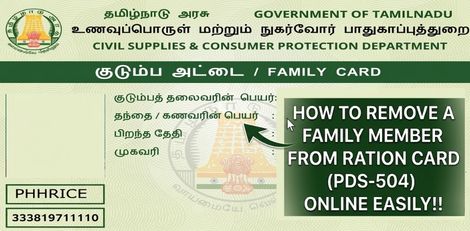
Service Code: PDS-504 | Department: Civil Supplies and Consumer Protection Department
Purpose:
The Removal of Family Member in Ration Card service enables existing ration card holders to remove a family member from their household ration card through the e-District portal. This service is designed for:
- Families after death of a member (removal of deceased member)
- Married daughters/sons who have moved to their spouse`s household
- Members relocating permanently to another address/city
- Members acquiring separate ration card (forming their own household)
- Duplicate/ineligible entries needing correction in family records
Required Information:
Mandatory Details:
- Registered Mobile Number (10-digit mobile linked to ration card)
- OTP Verification (authentication via OTP sent to registered mobile)
- Existing Ration Card Details (auto-fetched upon verification)
- Family Member to be Removed (select from list of existing members)
- Reason for Removal (specific reason for removal)
- Supporting Documents (proof for reason of removal)
Special Requirements:
- Mobile OTP Verification: Application requires OTP verification on registered mobile number
- Auto-Fetch Details: Ration card details automatically fetch from registered data upon OTP verification
- Existing Card Required: Must have a valid existing ration card (Smart Card)
- Reason Documentation: Must provide valid reason with supporting proof
- Member Selection: Choose specific member(s) to be removed from the family list
Step-by-Step Application Process:
1. Access the Portal: Login to the Tamil Nadu e-Sevai Portal (https://tnesevai.tn.gov.in) as an Operator
2. Navigate to Service:
- Click on Services from the left panel
- Select Civil Supplies and Consumer Protection Department from the department list
- Click on PDS-504 Removal of Family Member in Ration Card
3. SECTION 1: Register Mobile Number Verification
- Enter the registered 10-digit mobile number (linked to ration card)
- Enter the Captcha code displayed on screen
- Click Submit
4. SECTION 2: OTP Verification
- An OTP (One-Time Password) will be sent to the registered mobile number
- Enter the received OTP number in the provided field
- Click Submit to verify
- System verifies and proceeds to next step
5. SECTION 3: Select Member for Removal and Provide Reason
- Upon OTP verification, existing family member list is displayed
- Select the member to be removed from the family list
- Enter the reason for removal with specific details:
- Death of member (with date)
- Marriage and relocation (daughter/son moving to spouse`s family)
- Permanent relocation/migration to other place
- Member obtaining separate ration card
- Duplicate entry correction
- Any other valid reason as per rules
- Provide additional details relevant to the reason selected
6. Upload Supporting Documents:
- Upload necessary documents based on removal reason:
- Death certificate (for deceased members)
- Marriage certificate (for married daughters relocating)
- Proof of new address/ration card (for members moving out)
- Affidavit/declaration (as applicable)
- Any other supporting proof requested
7. SECTION 4: Declaration and Submission
- Read and accept the declaration
- Verify all details entered
- Click Submit to submit the application
8. SECTION 5: Make Payment
- Click Make Payment after document upload/submission
- Service Fees will be displayed on payment page
- Click Confirm Payment to proceed
9. SECTION 6: Download Acknowledgement Receipt
- Acknowledgement receipt will be shown after successful payment
- Click Print Receipt to download/print the receipt
- Save the receipt using Transaction Number for future reference
- Receipt contains application details and transaction information
Document Requirements:
Supporting Documents Needed (based on removal reason):
For Death of Member:
- Death Certificate (issued by competent authority)
- Medical Certificate (if death certificate not available)
- Burial/Cremation Certificate (in some cases)
For Marriage and Relocation:
- Marriage Certificate (registered or authorized)
- Proof of new residence of the member (if available)
- Affidavit from the member/family
For Permanent Relocation/Migration:
- Proof of new address (rental agreement, utility bill, etc.)
- Declaration from the member about relocation
- Employer certificate (if job relocation)
For Member Obtaining Separate Ration Card:
- Copy of new ration card application/approval
- Declaration from member
- Proof of separate residence
For Duplicate Entry Correction:
- Affidavit explaining duplicate entry
- Proof that it`s the same person (if needed)
General Documents:
- Existing ration card copy
- Aadhaar cards of remaining family members
- Identity proof of applicant (head of family)
Payment Details:
- Service Fees: As displayed on payment page (includes e-Sevai Centre Charges)
- Government Fees: As applicable
- Payment Confirmation: Required to complete application
After Submission:
- Application Tracking: Status can be checked using Transaction Number/Application Number
- Verification: Application will be verified by concerned officials
- Field Verification: Possible physical verification in some cases
- Approval: Processed by Civil Supplies Department
- Update: Ration card updated with member removed
- Smart Card Update: Existing smart card may need reprinting or endorsement
- Notification: Applicant notified upon approval/completion
Downloading/Checking Application Status:
1. Go to Check Status section on the portal
2. Enter Application Number or Transaction Number
3. Click Search to view current status
4. Track progress through various stages (submitted, under verification, approved, completed)
Important Notes:
- Mobile Registration: The mobile number used must be registered with the ration card
- OTP Mandatory: OTP verification is compulsory for security and authentication
- Head of Family: Application should ideally be made by head of family or authorized member
- Accurate Reason: Provide specific and truthful reason for removal
- Document Proof: Supporting documents mandatory based on removal reason
- Death Cases: For deceased members, apply for removal as soon as possible to prevent misuse
- Married Daughters: Common for daughters after marriage to be removed from parental ration card
- Duplicate Cards: Members cannot be on two ration cards simultaneously
- Benefit Impact: Removal may affect family`s ration quantity/eligibility
- Member Consent: Where possible, obtain consent of member being removed
- Verification: Officials may contact for additional verification
- Processing Time: Varies based on reason and document verification
Valid Reasons for Removal (Generally Accepted):
- Death of family member
- Marriage (daughter shifting to husband`s family)
- Permanent relocation/migration to other district/state
- Member obtaining separate ration card
- Duplicate entry in same ration card
- Member moving to old age home/institution
- Court order (in special cases)
- Government directive (for ineligible members)
- Correction of errors (wrongly included member)
Consequences of Removal:
- Member removed will no longer receive ration benefits under this card
- Family`s total entitlement may be recalculated
- Removed member may be eligible to apply for separate ration card (if criteria met)
- For deceased members, family may be eligible for ex-gratia/schemes (varies by state)
- Removed member`s Aadhaar will be delinked from this ration card
Assistance:
- Apply Online: https://tnesevai.tn.gov.in
- Visit: Nearest e-Sevai Centre / CSC Centre for application assistance
- Help Desk: Contact Tamil Nadu e-Governance Agency for technical support
This guide is based on the Tamil Nadu e-District User Manual (PDS-504). Government of Tamil Nadu.
Top Stories
-
 Tomorrow Panchangam October 27, 2026 | Auspicious Timings, Rahu Kalam, Gulikai26/Oct/2026 6:04:45 PM
 -
 Chennai’s Architecture and Construction Sector: Major Projects and Emerging Trends in 202626/Oct/2026 5:52:19 PM
 -
 Tamil Nadu Monsoon Alert: Kodaikanal Red Alert, Vaigai Dam Water Level Reaches 50 Feet26/Oct/2026 5:18:23 PM
 -
 Orange Alert for Nagapattinam: Heavy Rain Expected in 6 Tamil Nadu Districts26/Oct/2026 5:10:58 PM
 -
 Ooty Mountain Train Service Cancelled Until October 29 Due to Restoration Work26/Oct/2026 5:05:55 PM
 -
 Bigg Boss Tamil 10: Actor Raghav Says TTF Vasan’s Fan Base Could Influence the Final Results26/Oct/2026 4:53:00 PM

 JB Soft System