
How to Apply for Reprint of Smart Card (Ration Card) Online Easily!!
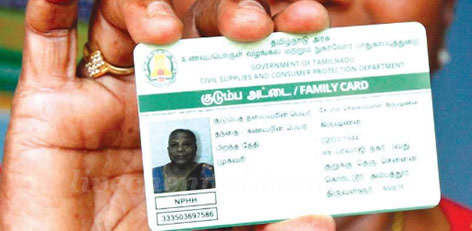
Service Code: PDS-506 | Department: Civil Supplies and Consumer Protection Department
Purpose:
The Reprint of Smart Card Application service enables existing ration card holders to request a reprint of their lost, damaged, or defective ration smart card through the e-District portal. This service is designed for:
- Families with lost ration cards (misplaced or stolen cards)
- Households with damaged cards (torn, worn out, or physically damaged smart cards)
- Beneficiaries with defective cards (cards not working/reading properly)
- Families needing duplicate cards (additional copy for different family members)
- Any ration card holder requiring a replacement smart card
Required Information:
Mandatory Details:
- Registered Mobile Number (10-digit mobile linked to ration card)
- OTP Verification (authentication via OTP sent to registered mobile)
- Reason for Reprint (selection of appropriate reason from dropdown)
- Supporting Documents (if required based on reason selected)
Special Requirements:
- Mobile OTP Verification: Application requires OTP verification on registered mobile number
- Auto-Fetch Details: Applicant details automatically fetch from registered data upon OTP verification
- Existing Card Required: Must have a valid existing ration card record in the system
- Reason Selection: Must select valid reason for reprint request
- Fee Payment: Service charges applicable as per government norms
Step-by-Step Application Process:
1. Access the Portal: Login to the [Tamil Nadu e-Sevai Portal](https://tnesevai.tn.gov.in) as an Operator
2. Navigate to Service:
- Click on Services from the left panel
- Select Civil Supplies and Consumer Protection Department from the department list
- Click on PDS-506 Reprint of Smart Card Application
3. SECTION 1: Register Mobile Number Verification
- Enter the registered 10-digit mobile number (linked to ratioion card)
- Enter the Captcha code displayed on screen
- Click Submit
4. SECTION 2: OTP Verification
- An OTP (One-Time Password) will be sent to the registered mobile number
- Enter the received OTP number in the provided field
- System verifies and proceeds to next step
5. SECTION 3: Applicant Details
- Upon OTP verification, applicant details automatically fetch from registered data
- System displays existing applicant information including:
- Applicant name
- Ration card number (Smart Card Number)
- Family details
- Current address
- Review the auto-fetched details for accuracy
6. SECTION 4: Reason for Reprint of Smart Card
- Select the appropriate reason for reprint from the dropdown menu
- Common reasons include:
- Card Lost (ration card misplaced or stolen)
- Card Damaged (physically damaged, torn, worn out)
- Card Defective (chip not working, card not readable)
- Printing Error (errors in existing card)
- Name/Address Change (after approved change request)
- Card Worn Out (old card needing replacement)
- Any other reason as specified
7. Upload Supporting Documents (if required):
- Based on the reason selected, upload necessary documents:
- For Lost Card: FIR copy (if stolen) or affidavit for lost card
- For Damaged Card: Photograph of damaged card (if possible)
- For Defective Card: Statement about defect (if applicable)
- For Name/Address Change: Proof of approved change request
8. Make Payment:
- Click Make Payment after selecting reason and uploading documents
- Service Fees will be displayed on payment page
- Click Confirm Payment to proceed
9. Download Acknowledgement Receipt:
- Acknowledgement receipt will be shown after successful payment
- Clickck Print Receipt to download/print the receipt
- Save the receipt using Transaction Number for future reference
Document Requirements:
Documents Needed Based on Reason:
For Lost Card:
- FIR copy (if card was stolen)
- Affidavit on stamp paper declaring loss of card (if no FIR)
- Identity proof of applicant
For Damaged Card:
- Photograph of damaged card (if available)
- Statement/declaration about damage
For Defective Card:
- Statement about defect (non-readable, chip issue, etc.)
- Old defective card (to be surrendered when new card received)
For Name/Address Change:
- Proof of approved change request (PDS-503 or PDS-505 approval)
- Supporting documents for the change
General Documents:
- Existing ration card copy (if available)
- Aadhaar card of head of family
- Identity proof of applicant
Payment Details:
- e-Sevai Centre Charges: ₹30.00 (as per specimen receipt)
- Government Fees: As applicable (may vary based on reason and district)
- Total Amount: As displayed on payment page
- Payment Confirmation: Required to complete application
After Submission:
- Application Tracking: Status can be checked using Transaction Number/Application Number
- Verification: Application will be verified by concerned officials
- Approval: Processed by Civil Supplies Department
- Card Printing: Smart card printed upon approval
- Card Delivery: Dispatched to registered address or available for collection at center
- Timeframe: Typically 15-30 days depending on workload and location
Downloading/Checking Application Status:
1. Go to Check Status section on the portal
2.2. Enter Application Number or Transaction Number
3. Click Search to view current status
4. Track progress through various stages (submitted, under verification, approved, printing, dispatched)
Important Notes:
- Mobile Registration: The mobile number used must be registered with the ration card
- OTP Mandatory: OTP verification is compulsory for security and authentication
- Auto-Population: Applicant details automatically fetch after OTP verification - verify for accuracy
- Valid Reason: Select the correct reason for reprint to avoid processing delays
- Document Submission: Provide all required documents based on the reason selected
- Lost Card Cases: For lost cards, FIR or affidavit is mandatory in most cases
- Damaged Card: Surrender the old damaged card when collecting the new one (if requested)
- Duplicate Cards: Only one active smart card per ration card is typically allowed
- Fee Payment: Service charges apply; amount varies by reason and location
- Processing Time: May vary based on verification requirements and printing schedule
- Address Verification: For lost cards, additional address verification may be conducted
Valid Reasons for Reprint (Common Categories):
- Card Lost (misplaced, lost, or stolen)
- Card Damaged (physically damaged, torn, burnt, water-damaged)
- Card Defective (chip malfunction, not readable by POS device)
- Printing Error (errors in name, address, or member details)
- Name Change (after legal name change or correction)
- Address Change (after relocation within same district/state)
- Card Worn Out (normal wear and tear after prolonged use)
- Additional Copy (for different family members - subject to rules)
Sample Receipt Information (as per specimen):
- Receipt No: 202203050105929591
- Department: Civil Supplies and Consumer Protection Department
- Applicant Name: Jesu Doss L
- e-Sevai Centre Chargrges: ₹30.00
- Total Amount: ₹30.00
- Centre Name & Code: Madhavaperumalkoil Panchayat - TACTV-TACTR1015
Important Cautions:
- Report Loss Immediately: For lost cards, report immediately to prevent misuse
- Do Not Destroy Old Card: Keep damaged card until new card is received (if requested for surrender)
- Verify Details: Check auto-fetched details carefully before submission
- Keep Receipt: Save acknowledgement receipt for tracking and future reference
- Follow Up: Track application status regularly; follow up if delayed beyond normal timeframe
Assistance:
- Apply Online: [https://tnesevai.tn.gov.in](https://tnesevai.tn.gov.in)
- Visit: Nearest e-Sevai Centre / CSC Centre for application assistance
- Help Desk: Contact Tamil Nadu e-Governance Agency for technical support
- Local Office: Contact local Civil Supplies Office for status inquiries
This guide is based on the Tamil Nadu e-District User Manual (PDS-506). Government of Tamil Nadu.
Top Stories
-
 Tomorrow Panchangam June 27 2026 | Auspicious Timings, Rahu Kalam, Gulikai26/Jun/2026 5:51:10 PM
 -
 ChatGPT Tip: Compare Products Smarter Before You Buy26/Jun/2026 5:37:31 PM
 -

-

-
 Discover the Vibrant Flavours of Thailand at Sian, Vivanta Chennai, IT Expressway26/Jun/2026 5:23:44 PM
 -
 CMRL Plans New Chennai Metro Line – See This Full Video26/Jun/2026 4:57:50 PM