
WhatsApp Introduces Scheduled Messages: Send Texts, Photos and Videos Later
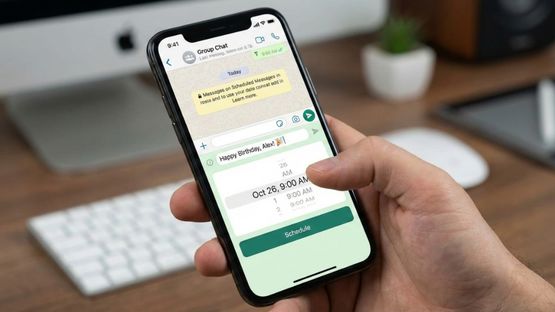
WhatsApp has introduced a new feature that allows users to schedule messages and send them at a chosen date and time. The feature can be used to schedule text messages, photos and videos for both individual chats and groups.
Users can schedule messages from 10 minutes to up to 14 days in advance. WhatsApp says the scheduled message will be delivered at the selected time even if the phone is switched off or does not have an active internet connection at that moment.
How to Schedule a Message on WhatsApp
Scheduling a message is simple:
1. Open the WhatsApp chat where you want to send the message.
2. Type the message or attach a photo or video.
3. Press and hold the Send button.
4. Select “Pick your desired delivery date and time.”
5. Choose the required date and time and confirm the schedule.
The feature can be used for both personal chats and WhatsApp groups.
Edit or Delete Scheduled Messages
Users can view their scheduled messages in the scheduled-message list. If any changes are needed, a scheduled message can be edited or deleted before it is sent.
The scheduling feature supports different types of content, including text messages, photos and videos. Users can schedule multiple messages for individual chats or groups as needed.
Top Stories
-
WhatsApp Introduces Scheduled Messages: Send Texts, Photos and Videos Later27/Nov/2026 11:40:51 AM
-
 Tamil Nadu Government to Procure 2,732 DGPS Survey Devices to Improve Land Measurement Accuracy27/Nov/2026 11:29:44 AM
-
 Chennai Metro Milestone: Six Trains to Pass Through Kathipara Junction Simultaneously by 202727/Nov/2026 11:13:07 AM
-
 Guindy Children’s Park to Remain Closed for 3 Days From November 2827/Nov/2026 10:59:37 AM
-
 Tamil Nadu to Set Up 6 Model Property Registration Centres in Chennai, Tambaram and Other Areas27/Nov/2026 10:40:42 AM
-
Chennai Rain Today: Moderate Rain in Several Areas27/Nov/2026 10:22:36 AM

 JB Soft System